Version control for
Ableton Live projects.
Snapshot your work. Add notes your collaborator can see. Sync changes
through a relay you control. No cloud subscription. No plugins. No accounts.
If you've made music in Ableton with another person, you know the pain.
"Can you send me the latest version?"
USB sticks, Dropbox folders full of Project_Final_2.als, Project_FINAL_3.als, Project_FINAL_3_mix2.als. Nobody knows which one is current.
"That fill at bar 48 — fix it"
Endless text threads, voice notes, and emails. "The kick at 1:23." "Which kick?" "The one I mentioned last week." Cues get lost, context evaporates.
"It sounded better two weeks ago"
No version history. You save over your arrangement, bounce stems, print the mix, and… you want the old bass part back. Too late. It's gone.
"Can you open this on my Windows machine?"
You work on a Mac at the studio and a PC at home. Or your collaborator is on a different OS. Projects move between machines, plugins go missing, paths break.
Clavus doesn't fix all of this. But it fixes the ones that waste the most time.
What Clavus Actually Does
It snapshots your .als file — the whole thing, content-addressed by SHA256 — and lets you sync those snapshots between machines through a lightweight relay. It also lets you pin timeline comments (cues) that travel with the project. That's it. That's the core.
Time-travel for your project
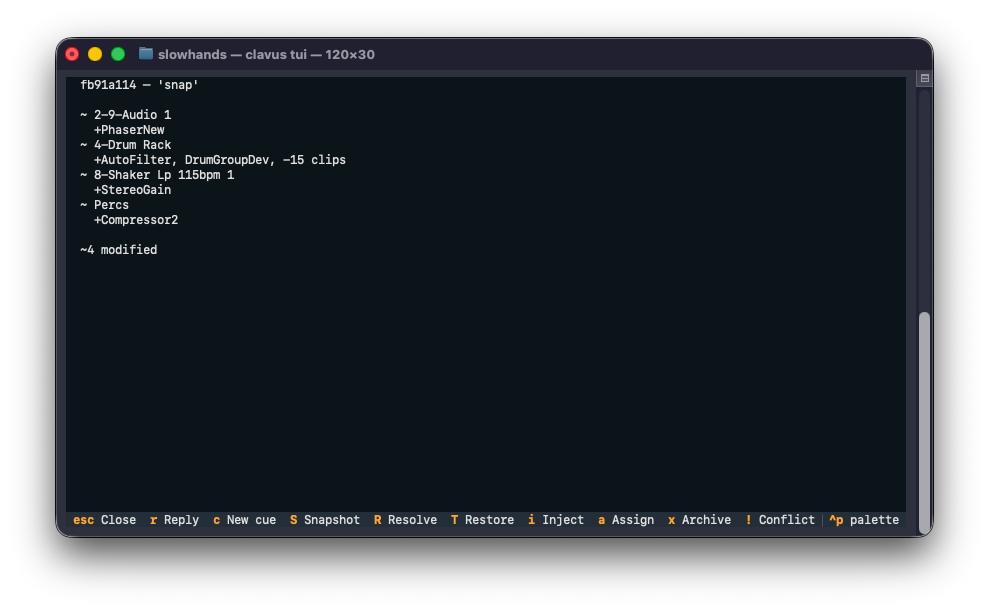
Press S in the dashboard, and Clavus saves a complete, recoverable snapshot of your project at that moment. Every snapshot knows its parent — you can walk backwards through your arrangement passes, restores, experiments, and dead ends. Press T to jump back to any of them. Press d to see exactly what changed between two snapshots (tracks added, devices changed, clips moved).
Collaboration that works like version control (because it is)
One person runs a relay on their machine. Everyone else connects to it via Tailscale. Push your snapshots up, pull theirs down. Work offline, sync when ready. If two people edit the same thing, you get a conflict marker — resolve it with one keypress. Your work is never overwritten without you choosing.
Cues that survive sync
Add a note at bar 48. Your collaborator pulls, sees it on their timeline. Reply to it. Mark it resolved. Inject cues as Ableton markers with one command. No more "what I meant was…" three messages later.
Stems, too
Export your tracks as WAVs, import them into Clavus, push them to the relay. Your collaborator pulls and gets stems materialized alongside the project. Useful for sharing wet/dry splits, reference mixes, or stem masters.
How It Connects
One person runs the relay. Everyone else connects. Data stays on machines you control.
Let's be straight with each other.
Clavus is useful. Really useful, if you work the way it expects you to work. But it's not magic, and it's not for everyone. Here's what you should know before you install it.
What Clavus is
- A terminal app. It has a text-based UI (TUI) that runs in your terminal. It's keyboard-driven, fast, and stable. It's not a GUI window you can drag around. If you're comfortable with a terminal, it will feel natural. If you're not, there's a learning curve — and we're honest about that. The payoff is that it works reliably on Mac and Windows without Electron, without a browser, without 200MB of dependencies.
- Self-hosted. You run the relay. Your data stays on machines you control. There's no Clavus cloud. There's no account. There's no subscription. There's also no one to call if your relay goes down — you own it.
- A sync tool for .als files, not a DAW replacement. It snapshots what Ableton saves. It doesn't merge arrangements. It doesn't resolve plugin conflicts. It doesn't let two people edit the same clip simultaneously. It saves versions of your project and moves them between machines.
What Clavus is not
- Not a cloud service. No sign-up, no data on our servers, no "we'll be in touch about your subscription." You download it, you run it, you own it.
- Not a plugin. No VST, no AU, no Max for Live device (yet). You don't install it inside Ableton. You work in Ableton as always, then snapshot and sync from your terminal.
- Not real-time. There's no live co-editing. Push and pull are explicit actions. This is actually a feature — you work offline, sync when ready, resolve conflicts on your own time.
- Not polished like a commercial product. Clavus is built by a producer who needed this to exist and figured other producers might too. The UI is functional, the documentation is honest, and the code is MIT-licensed. You can read every line.
What It Looks Like
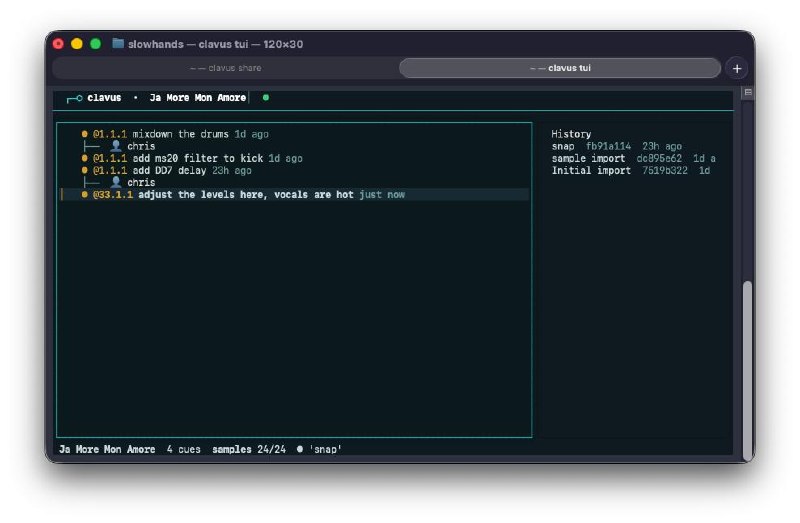
Clavus runs in your terminal. The dashboard is split into two panes: cues on the left, snapshot history on the right. Press d to diff any two snapshots and see exactly what changed — tracks added, devices changed, clips moved.
Get Clavus Running in 5 Minutes
You need Python 3.10+, Tailscale (free tier), and an Ableton project to try it with.
1. Install
$ cd clavus
$ pip install -e . # or: py -m pip install -e . (Windows)
2. Add a project
3. Open the dashboard
Press S to snapshot, c to add a cue, T to restore. Read the full guide at README.md.
To collaborate
One person runs clavus share --port 7891 to start the relay. Others run clavus join http://their-tailscale-url:7891. Then pull, push, repeat. Full details in the Collaborator Quickstart.
Early Days, Active Development
Clavus came together through late nights and real studio sessions — a small team of producers who needed this to exist, building and testing it across Mac and Windows between sessions. It's still early. The TUI is functional, not beautiful. Some error messages could be clearer. You might find a bug we haven't hit yet. But it works, and we use it every day.
That's where you come in. Clavus is MIT-licensed, which means you can read every line of code, modify it, and share it. But even if you never open the code, you can help by:
- Reporting bugs. Something broke? Open an issue on GitHub Issues. Include what you were doing, what you expected, and what happened.
- Sharing feedback. The workflow makes sense to us because we built it. Tell us where it's confusing or missing something you need.
- Spreading the word. If Clavus saves you time, tell another producer. That's how tools like this grow.
Every issue filed, every feature request, every “this part was confusing” helps us make it better. We're in this for the long haul.
Support Clavus
♥
Clavus is free, open-source (MIT), and will always be free. We've put hundreds of hours into getting this right—debugging cross-platform sync issues, building the TUI, testing with real projects, and writing honest documentation.
If Clavus saves you time, frustration, or a lost arrangement, consider throwing a few dollars our way. It helps justify the late nights to our families.